
Updated 2026-09-20 after filing the request on a live account. Four things in the first version were wrong and are corrected below.
Key takeaways
- File the request yourself. Certification and authorization are two separate gates, and nothing connects them on your behalf.
- Name every ad account on the one request. Authorization state is per ad account, but a single filing covers every account you select on screen three, and they come back sharing one authorization ID.
- Stop looking for an upload button. Meta asks for the certified URL as a string and validates it against LegitScript’s records.
- Answer the business type honestly. Only Pharmaceutical manufacturer skips LegitScript, and a telehealth brand has no second route.
- Audit the destination page before you file. It is read alongside the ad, and certification stops at the root domain, so a pages.dev address is not covered.
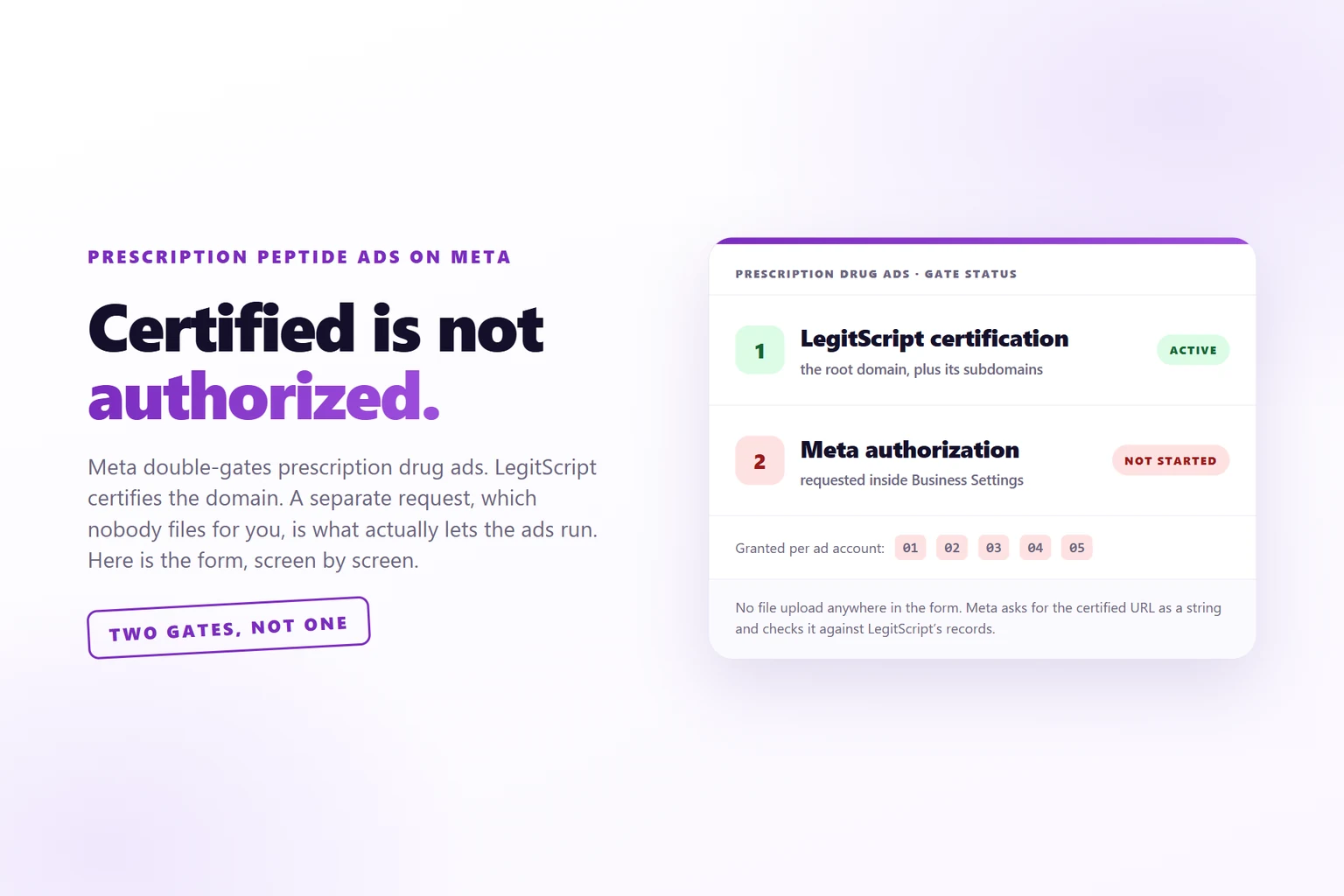
To run prescription drug ads on Meta you need two things, not one: an active LegitScript certification for the domain, and a separate authorization request filed inside Business Settings for each ad account that will run the ads. The certificate alone does nothing.
You hold a LegitScript certificate. The ads are getting rejected anyway, or the ad account is already disabled under Drugs and Pharmaceuticals, and every piece of advice you can find tells you to upload the certificate to Meta.
There is nowhere to upload it. Meta’s prescription drug authorization form has no attachment field on any of its four screens.
What it has instead is a request that a human has to file, per ad account. On most disabled telehealth accounts that request has never been opened. Not rejected, not pending, never started, with the certificate live the whole time, which is exactly why nobody thinks to check it.
Below is the procedure, in the order the screens come in.
What you are building
Seven steps, about twenty minutes of clicking, and one dependency you do not control.
By the end you have a read of the authorization state on every ad account in the portfolio, three facts taken off the LegitScript record, one submitted request naming every ad account that will run ads, a destination page that survives the reviewer who is also reading the ad, and copy written so it does not depend on the approval at all.
The dependency is whoever bought the certificate. Get them on the phone before step 2, because steps 3 through 5 stall without them.
Why holding the certificate is not enough
Meta’s Drugs and Pharmaceuticals policy stacks two pieces of work on top of each other, and most people read only the first. Online pharmacies and telehealth providers must be actively certified with LegitScript. Then, separately, the advertiser must request authorization from Meta.
Two gates. Certification is a contract with LegitScript about a domain. Authorization is a request inside Meta that names that domain and the ad accounts. LegitScript does not notify Meta on your behalf, and Meta does not go looking. The request is the only thing that joins them, and nobody files it for you.
Hold the first gate open, skip the second, and what Meta’s enforcement sees is a telehealth brand running prescription ads on an account with no authorization. That is the ban, and it does not care how clean the creative was.
Two more rules from the same policy, worth settling before anyone argues about them. The ads have to carry a disclaimer to consult a licensed health professional or obtain a valid prescription. And ads that only educate or advocate about prescription drugs do not need written authorization at all. If you are selling the prescription, you are in the authorization path.
Step 1: read the authorization state on every ad account
Go to Business Settings, then Authorizations and verifications, then Prescription drug ads. The URL carries a verification_type=RXDRUGS parameter, so bookmark it the first time and skip the menu after that.
A locale note that costs people ten minutes: Meta localises the spelling. On a portfolio set to a British locale the menu reads Authorisations and verifications and the panel says authorisations. Same screen.
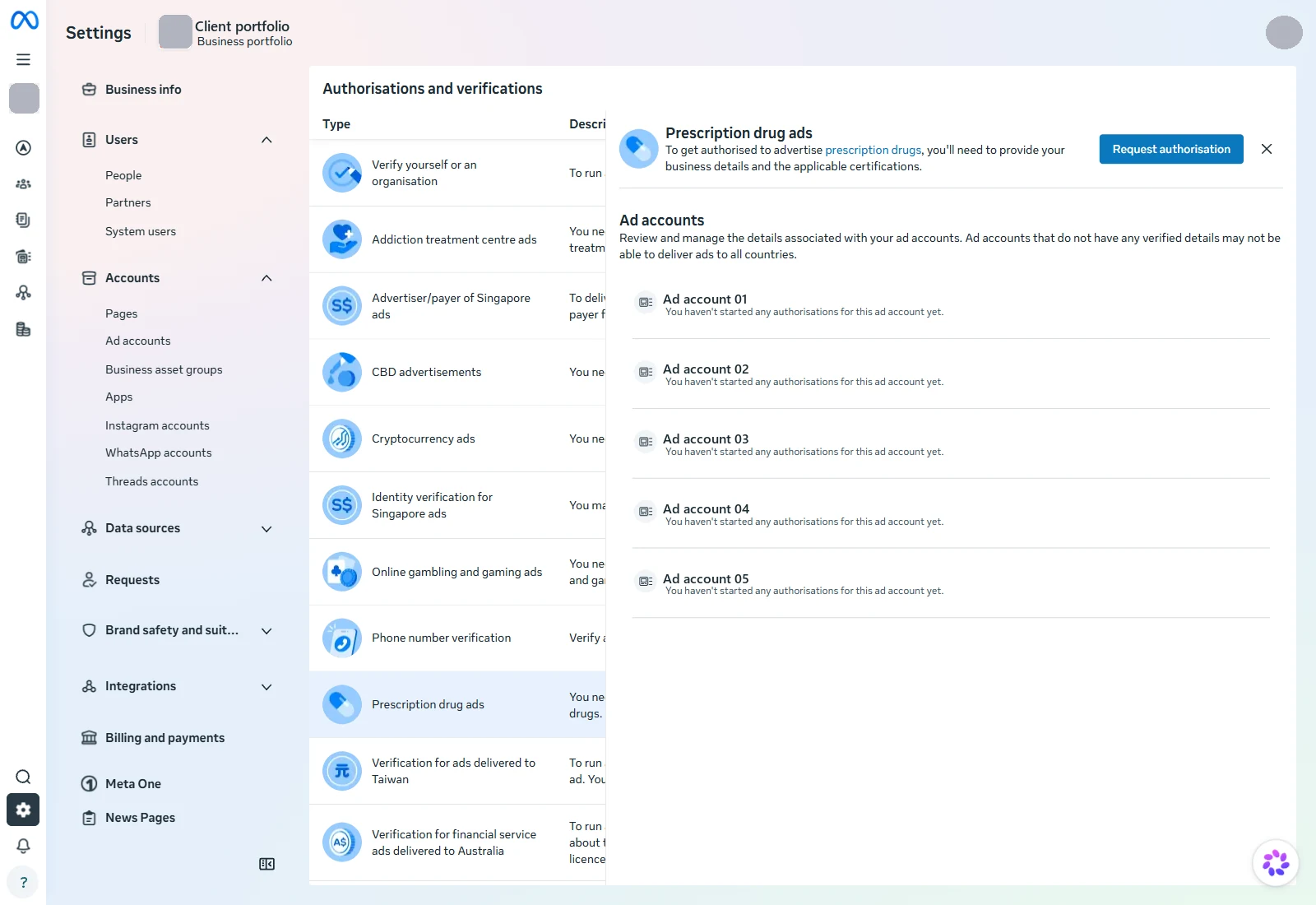
Read the list, not the button. The button tells you an authorization exists as a concept. The list tells you which accounts hold one, and that is the answer you came for.
Write down the exact wording against each account. “Not started” is the state you are most likely to find and it is nothing like “rejected”. Rejected means somebody looked at it. Not started means the ads were built, published and disabled while the request sat unopened.
Not rejected. Not pending. Never opened. Rejected means somebody looked at it.
Meta’s own sentence on that panel is that you need to request authorization for each ad account that will advertise prescription drugs. Practitioner write-ups disagree about this constantly and several will tell you the authorization is business-level. The screen settles it: there is no portfolio-level answer to read, only one line per account.
That does not mean one submission each. Screen three takes a multi-select, and every account you tick comes back authorized off the same filing, sharing one authorization ID. What is per account is the state, not the paperwork. The trap is leaving an account off the list, not failing to file five times.
Step 2: get three facts off the LegitScript record
Every hard part of the form comes from a record that belongs to whoever bought the certificate. Get it in front of you before you open anything. Pull three facts out of it:
- the exact certified URL string
- the legal entity name on the certificate
- the expiry or renewal date
Two sources work. The LegitScript confirmation email is the one everyone names, and it is also the one that went to a client eight months ago and cannot be found. The merchant’s own LegitScript portal is faster and carries the same facts on two tabs: the certification header shows the account name, the contact, the renewal date and the status, and the Certified Services tab lists the certified URL with its approval status. A screenshot of those two tabs is everything the form needs.
There is no field for a certificate number anywhere in Meta’s form. Do not hold up the filing waiting for one.
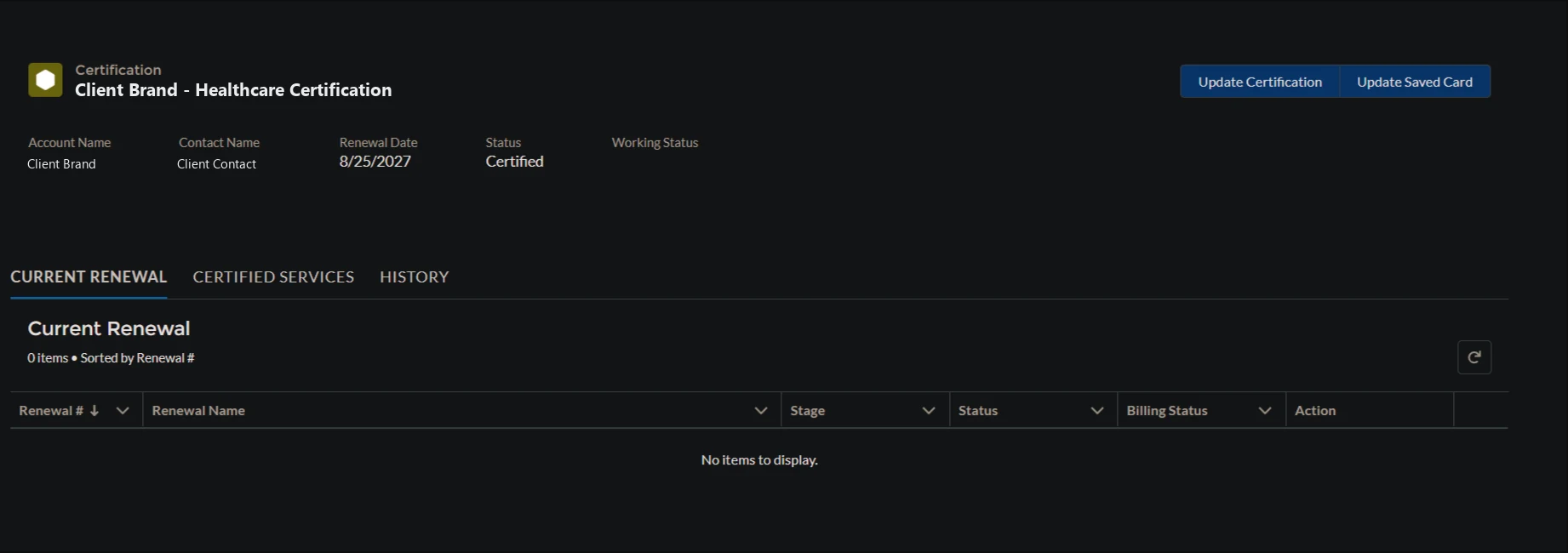
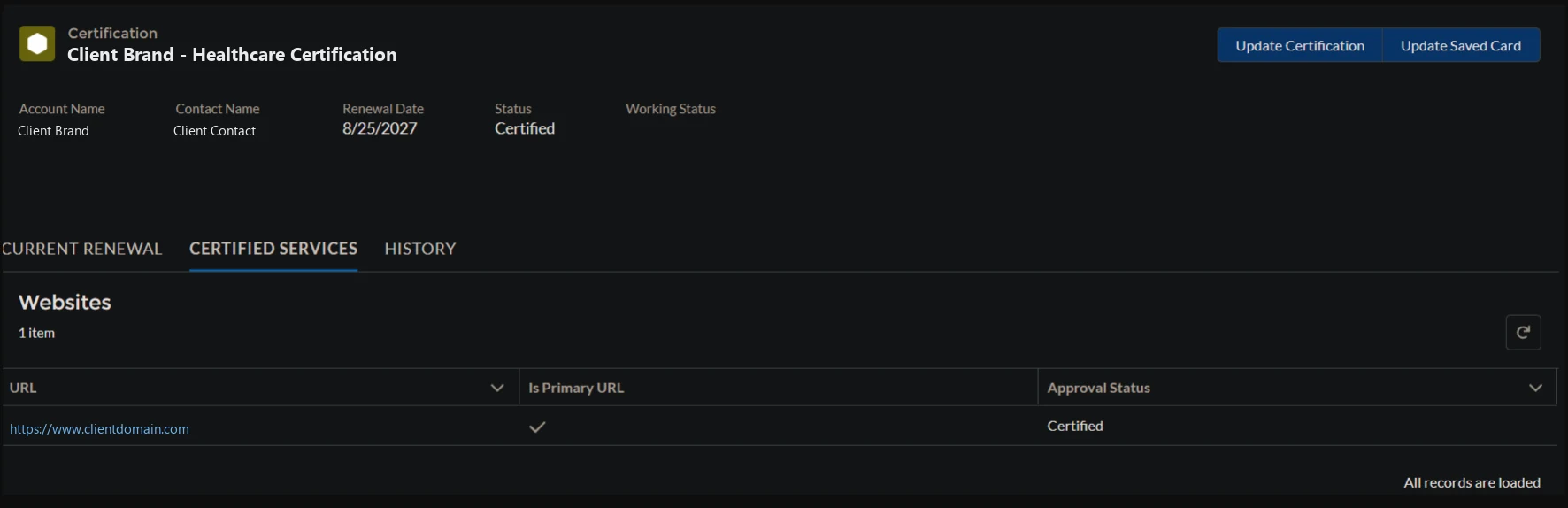
Do not substitute the seal on the website. It resolves, it links to LegitScript’s public checker, and it tells you the domain is certified. It does not tell you which legal entity holds the certificate, and that is the fact most likely to cost you the request.
Expect the names not to match. On these brands the website terms name an LLC, the Meta portfolio is named after a holding company, and the brand on the ads is a third thing.
One data point on which of them to type. On the request that went through, the business name field was filled with the legal entity already on the Meta portfolio’s own business verification, and that string was not identical to the account name on the LegitScript record, which carried the same entity without its suffix. It approved anyway. So the match that appears to matter is against Meta’s verified record of you, not against LegitScript’s label for you.
That is one approval, not a documented rule, so treat it as evidence rather than as permission to guess. Use the legal entity name on your business verification, and get the LegitScript record in front of you so you know whether the two disagree by a suffix or by a whole company.
Step 3: fill in advertising habits, and pick the business type carefully
Screen one asks two questions: where the ads will run, and what type of business this is.
The country list has three entries: United States, Canada and New Zealand. That is the whole eligible world for prescription drug ads and it matches the policy text. If your market is not one of the three, the answer is not a workaround, it is a different business model.
The business type dropdown has exactly three options.
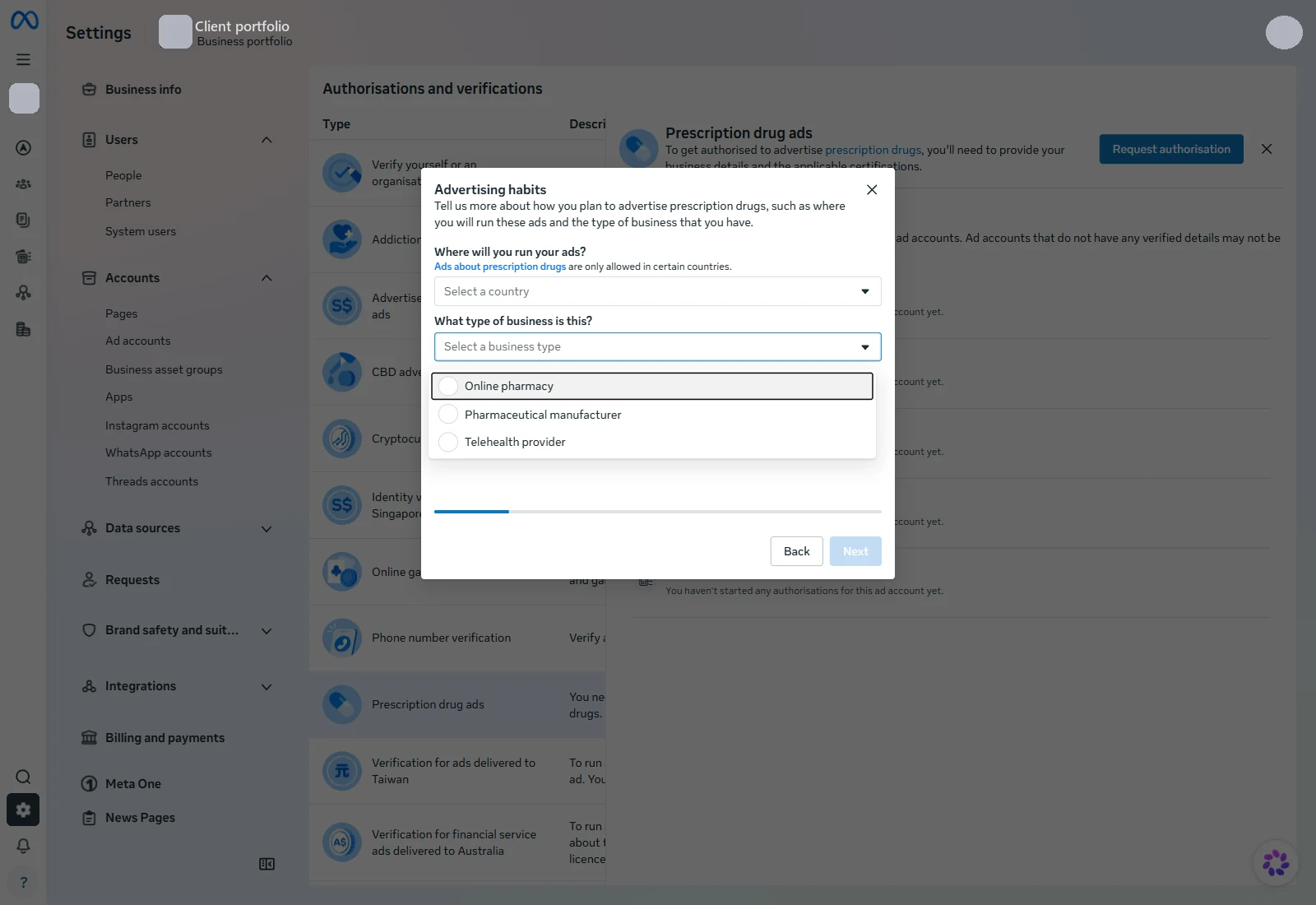
Picking manufacturer to dodge the certification is a misrepresentation on the one form built to check it. That loses the portfolio, not an ad.
Online pharmacy and Telehealth provider both land on LegitScript. Pharmaceutical manufacturer is the single route that skips it. If you sell through licensed providers and a compounding pharmacy, pick Telehealth provider, accept that the certification is load-bearing, and stop hunting for an alternative path, because there is not one. Picking manufacturer to dodge it is a misrepresentation to Meta on a form that exists to check exactly this, which is a creative way to lose the portfolio rather than one ad account.
Step 4: paste the certified URL, because there is nothing to upload
Screen two is one free-text box. Meta’s help text on it, verbatim:
Provide the website URL that has been certified by LegitScript. You should be able to find this information in the confirmation email sent by LegitScript. If our certification expires, we may lose authorisation and these ads may be taken down.
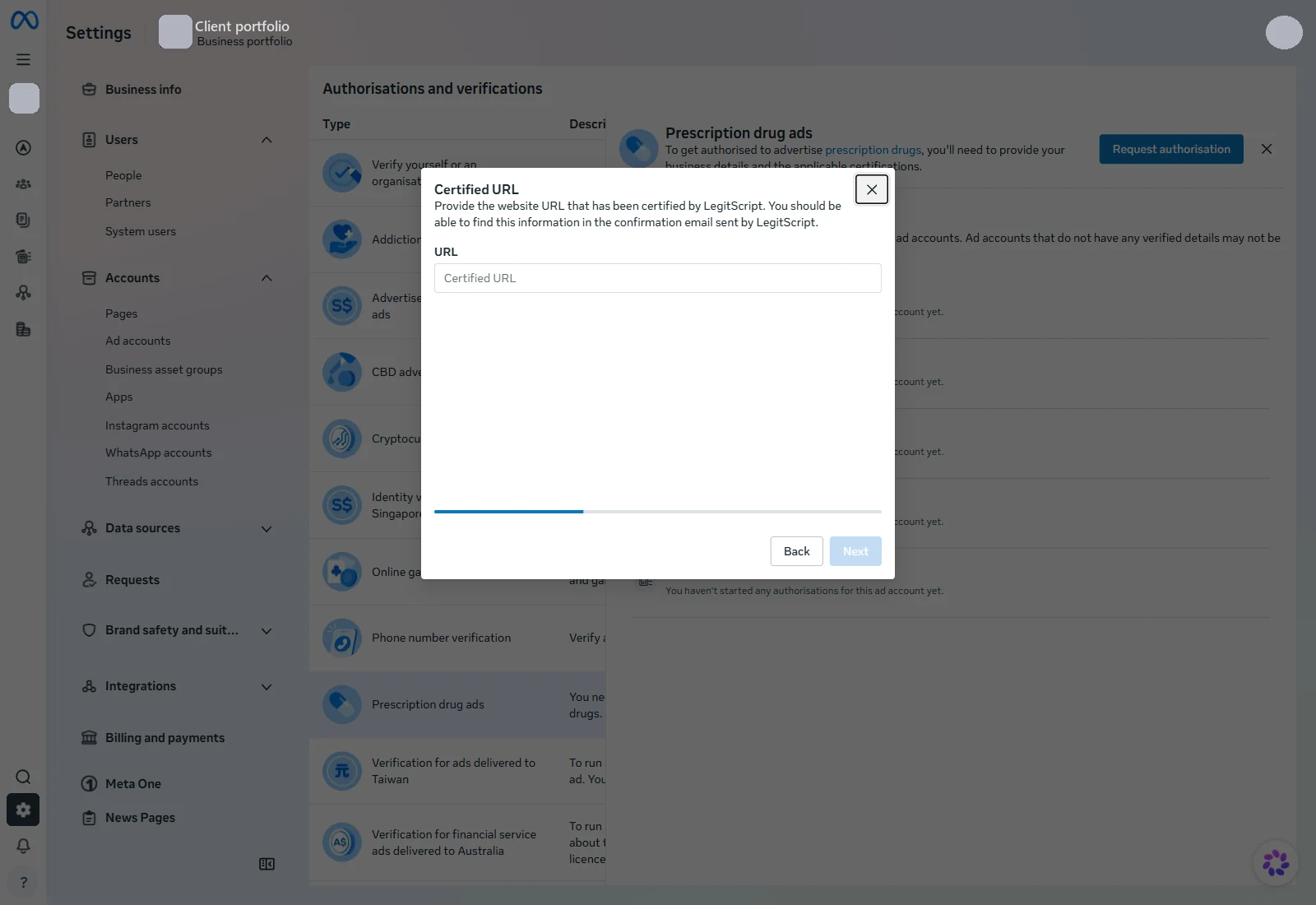
Paste the string from the record exactly as it appears, and move on. There is no upload to find, which is why “upload the LegitScript certification” is advice that sends people in circles until they give up and file nothing.
Then act on the second half of that help text. The authorization is tied to a certification that expires, so put the renewal date in a calendar somebody other than the certificate holder can see. The failure mode is an approved account that goes quiet months later for a reason nobody connects back to a lapsed certificate.
Step 5: name the business and select the ad accounts
Screen three asks for a business name as free text, then gives you a multi-select listing every ad account in the portfolio.
Select the accounts that will run the ads. A disabled account can go on the list: on this filing one of the three was disabled and under appeal, and it took the authorization exactly like the other two, same ID, same “Verification successful”.
Whether that helps the appeal is a separate question and I do not have an answer to it yet. What it does remove is the most obvious reason to reject one, because the account is no longer a telehealth brand running prescription ads with no authorization on it. Filing costs nothing and the authorization attaches whatever state the account is in.
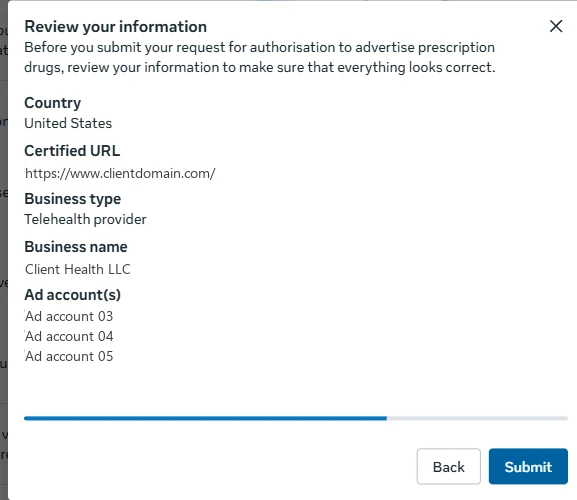
Screen three’s Next does not file anything. It opens a fourth screen, Review your information, which lists the country, the certified URL, the business type, the business name and every ad account you selected, with a Back button and a Submit button. Nothing reaches Meta until you press Submit there.
That is worth knowing in both directions. You can walk the whole form to read it without risk, which is how the first version of this article got written. And the review screen is the last place to catch a typo in the certified URL, which is the one field with nothing to fall back on.
Read every line on it before you submit. Meta normalises the URL you typed, so check that what it shows back is the string you meant.
What happens when you press Submit
Nothing, for about two seconds, and then it is done.
There is no review queue, no pending state and no email. The dialog returns “Authorisation successful. You are now able to run ads about prescription drugs.” Re-read the panel from step 1 and every account you named has flipped from “You haven’t started any authorisations for this ad account yet” to “1 associated authorisation”, with the certified URL, the country, an authorization ID and “Verification successful”.
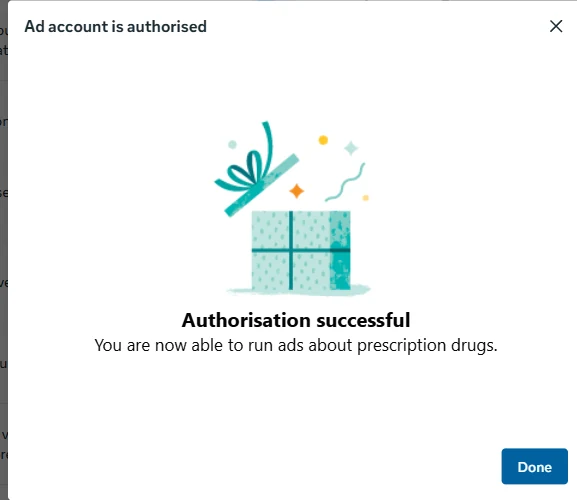
That tells you what the check actually is. Meta is not reading your site and not assessing your business. It is looking the certified URL up against LegitScript’s records and answering. Which means the thing to get right is the string, and the thing you cannot talk your way through is the certification.
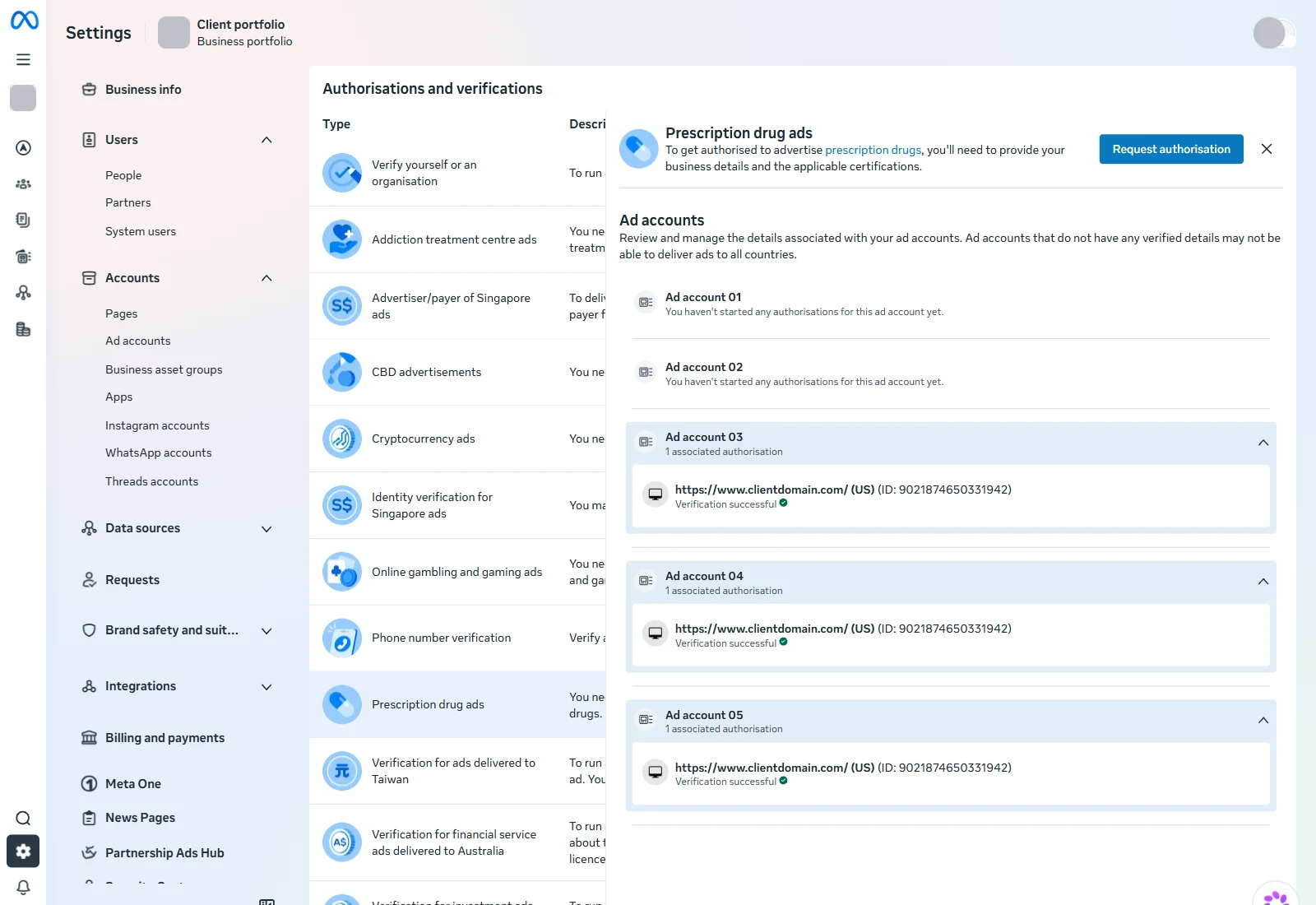
It also means the delay in this whole process was never Meta. On the account this article came from, the request sat unopened while the ads were built, published and disabled. The form that would have prevented it takes two seconds to answer.
Step 6: strip the claims off the destination page
This is not a gate on the authorization. The request approved on an account whose destination page carried all five of the claims below, because the check never opens the page. It is a gate on every ad you run afterwards, which is the part that actually costs you. The ad is not reviewed alone: the page it points at is read with it, and a clean ad dies on what the page says.
Open the destination page and hunt for these five shapes. On one disabled account, nineteen of the twenty published ads pointed at a homepage carrying all five at once.
| what to look for | why it goes |
|---|---|
| a percentage body-weight figure with a compound name and a time window | a clinical outcome figure sitting next to a compounded product |
| a named provider shown replying minutes ago | reads as a real message from a real clinician |
| “physician-prescribed” in the hero | says physician where it should say licensed provider |
| a HIPAA claim in the top bar | a compliance assurance, which is not a thing you assert in advertising |
| a money promise tied to not being prescribed | a price promise on a prescription product |
The first two are the serious ones. The FDA’s guidance for telehealth companies promoting compounded drugs is a list of prohibitions, not a template: no describing a compounded drug as a generic version or as the same as an approved drug, no claiming FDA approval, no claiming it is clinically proven to produce the same result, no branding that implies the telehealth company is the compounder. In March 2026 the FDA sent 30 warning letters to telehealth companies for exactly those claims.
Fix the page first anyway. LegitScript is reading it too, because its certification review covers affiliates, commonly owned domains, partners and links, so a claim on the destination is exposure on the certificate as well as on the ad account. It is also the cheapest of the three fixes and the only one entirely in your hands.
Step 7: point the ads at the certified root domain
LegitScript’s certification FAQ is explicit: certification applies to the root domain, and subdomains are covered by the same certificate. So put the landing pages on a subdomain of the certified site. No new application, no new fee, one CNAME.
brand.comthe certified root domainget.brand.comsubdomain, covered by the same certificateapp.brand.comsubdomain, covered by the same certificatebrand.pages.devits own root domain, on the Public Suffix ListNo Meta rule was found that rejects an uncertified destination outright, and I am not inventing one. What is documented is the scope of the certificate, and it stops at the root domain.
Do not use a pages.dev address. It sits on the Public Suffix List, which makes anything under it a registrable root domain in the eyes of browsers and of every system that reasons about eTLD+1. Your preview URL is a different site, not a subdomain of yours, and the certification does not reach it. The same goes for every other free hosting domain on that list.
I could not find a Meta rule that says an ad pointing at an uncertified domain is auto-rejected, and I am not going to invent one. What is documented is the certification’s scope and LegitScript’s review of linked domains. The inference from those two is that a prescription ad landing on an uncertified domain is exposure on both the ad review and the certificate, and repeated rejections in a restricted category are how accounts get disabled. Keep pages.dev for internal preview.
What the approval does not change
Plan the creative as though the approval buys less than you think, because it does. It opens the vocabulary. It does not touch the rules that come from Meta’s other policies.
The split is clearest on a B2B health infrastructure client that holds authorization on one ad account out of five. Approval unlocked drug class names, compound names, and words like pharmacy, prescription and compounded. It changed nothing about outcome claims, body framing, or ads that assert something about the viewer.
Those come from Personal Attributes and Health and Wellness, which bind everyone regardless of authorization. Meta’s own example of a violation is an ad asking whether the reader has a medical condition. A question about an ordinary experience is allowed. An assertion about the reader’s body is not, and that line is the whole reason question-shaped hooks are usable in this category at all.
So when you borrow a rulebook from another brand in the vertical, take their prohibitions and never their permissions. Prohibitions are platform policy and they transfer. Permissions are an authorization that account holds and yours does not.
One more thing the approval does not cover. Ad review and data source classification are different systems, so an ad can pass review and keep delivering while Meta classifies the destination domain and suppresses conversion events coming off it, with no alert anywhere. Check the data source category separately from the ad status, and read what each funnel stage should actually cost before you set a budget against a lead event.
Hand it to Claude Code
The audit half of this is a reading job, and reading jobs are what I hand over. Point Claude Code at the account and the site:
Audit this telehealth brand's readiness to run prescription drug ads on Meta.

1. In Meta Business Settings > Authorizations and verifications > Prescription drug ads,
   list EVERY ad account in the portfolio and its authorization state verbatim. Do not
   summarise to "authorized" or "not authorized". Screenshot the panel.
2. Open the LegitScript public checker for the brand's root domain. Record what it says
   and what it does NOT say. A seal image on the site is not evidence.
3. Crawl the ad destination page and every page linked from the primary nav. Flag, with
   the exact text and where it sits: outcome or percentage figures, named clinicians shown
   replying, the word physician where it should be licensed provider, HIPAA or
   confidentiality assurances, price promises, urgency, comparisons to a brand-name drug,
   and any claim of FDA approval or sameness.
4. Resolve the eTLD+1 of every ad destination against the Public Suffix List and say
   whether each one falls inside the certified root domain.
5. Output a table: gate, state, evidence, who can fix it. Mark anything you inferred as
   inference. Do not fill a gap with a plausible answer.
The last two lines are the ones that earn their place. Compliance work is where a model most wants to be helpful, and a confident guess about what a policy says is worse than a blank cell. Same principle as everything else in the operating model: the tool’s job is to be sceptical.
When not to do this
Four cases where this procedure is the wrong move.
The certificate is not actually live. The form has nothing to hold. Certification comes first, and it needs real time on the plan, because it is the long pole and nobody inside Meta can accelerate it.
Nobody can tell you which entity holds it. The business name field is free text, and while a filing went through on an entity name that did not exactly match the LegitScript record, one approval is not a rule. Get the record in front of you before you type, so that if it is ever questioned you can say what you based it on.
The ads only educate. Meta’s policy says ads that educate, advocate or run a public service announcement about prescription drugs do not need written authorization. Ads that sell one do. If the campaign genuinely sits on the education side, you are solving a problem you do not have.
You are betting the business on the category staying open. In December 2025 a coalition of 35 state attorneys general asked Meta to limit US prescription drug ads to FDA-approved medications. As of my last read of the policy text, no such rule appears in it. That is a live risk to compounded advertising, not a current rule, and the honest planning position is to keep a non-prescription creative set ready rather than to assume either outcome.
None of this is legal advice and I am not your compliance officer. It is the order the screens come in, which turns out to be the part nobody writes down. If you want the rest of the machine around it, that is what I build, and the case studies show what it looks like on live accounts. For the health vertical specifically, the clinic build is the closest shape, and telehealth founders come in through here.
I run paid acquisition end to end for regulated and expert-led brands: the compliance gates, the creative, the landing pages, and the tracking that proves which ad produced the money. One person, accountable for the number.
Work with me 1-on-1Read the rest of the breakdownsWe already hold LegitScript certification. Why did Meta reject the ads?
Because certification and authorization are two different gates. LegitScript certifies the domain. Meta then needs a separate authorization request, filed inside Business Settings, that names the certified URL and the ad accounts. LegitScript does not notify Meta on your behalf and Meta does not go looking. Until that request is filed and approved, the account is running prescription ads with no authorization on it.
Does one approval cover the whole business portfolio?
No, and it does not cover the accounts you left off the form either. The panel lists every ad account in the portfolio with its own separate state, so a portfolio with five accounts shows five independent lines. But you do not file five times. Screen three is a multi-select: tick every account that will run, submit once, and they all come back authorized against the same authorization ID. An account you did not tick stays unauthorized.
Where do I upload the LegitScript certificate?
Nowhere. The form has no attachment field, no document upload and no certificate PDF anywhere in it. The certified URL screen is a single free-text box, and Meta validates that string against LegitScript’s records. This is why people stall: they go hunting for an upload button that has never existed, and never file the request at all.
Can I pick Pharmaceutical manufacturer and skip LegitScript?
Only if you actually are one. The business type question offers Online pharmacy, Pharmaceutical manufacturer and Telehealth provider, and manufacturer is the one route that goes to Meta’s internal review instead of LegitScript. A telehealth brand has no second route, which makes the certification load-bearing rather than optional. Picking the wrong type to dodge a requirement is a misrepresentation to Meta.
Can the ads point at a Cloudflare Pages or Vercel preview URL?
Not safely. LegitScript certification applies to the root domain and its subdomains, so a subdomain of the certified site is covered with no new application. A pages.dev address is not a subdomain in any way that matters, because pages.dev sits on the Public Suffix List and is therefore its own root domain. Use a subdomain of the certified root instead.