
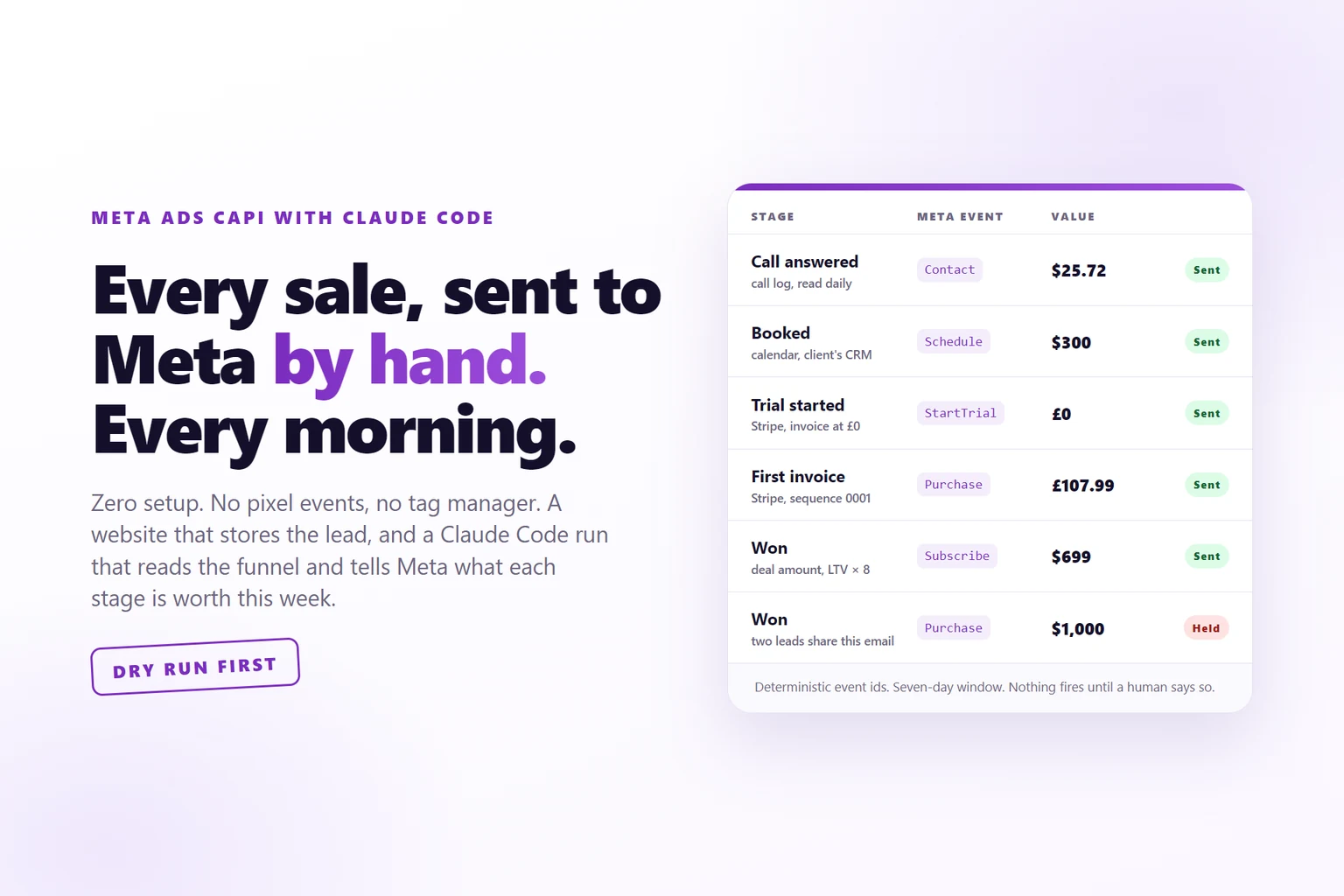
Key takeaways
- You do not need a pixel event setup, a tag manager or an event map. You need a website that stores each lead with the identifiers Meta uses, and a run that reads your funnel and sends the conversion later.
- The capture happens once, at the lead: click id, cookie id, UTMs, the ad, the page, the time. After that moment nothing else has to be tracked, whatever the funnel does next.
- The run reads the bottom of the funnel wherever it lives: Stripe, a CRM, a spreadsheet, a call log, a browser-only tool. One page per client tells Claude Code where and how.
- Every stage carries this week’s expected value, measured from the account, so Meta optimises for the funnel you have rather than the one you had on setup day.
- Dry run first, a human says fire, deterministic event ids. Point Claude Code at this page and it can build the whole thing for your stack.
Meta Ads CAPI tracking with Claude Code is a system with two halves: a website that stores every lead with the identifiers Meta uses to attribute a conversion, and a daily Claude Code run that reads your funnel wherever it lives, matches each sale or stage move back to that lead, and sends Meta the event through the Conversions API at the value it is worth. There is no pixel event setup, no tag manager and no event map to rebuild when the funnel changes.
You run Meta ads into a funnel with a sales process, and you want Meta to know who actually bought. Every guide gives you the same path: install the pixel, add the Conversions API, map every event, deduplicate the two, wire one automation per tool, then do it all again when someone swaps the calendar or adds a trial.
This is the other way. I run it every morning for every client, on stacks that share nothing: one client’s funnel is Stripe, one is Airtable, one is four systems that have to be joined by hand. It works on any stack because it does not depend on the stack. It depends on one stored row per lead and on Claude Code reading the funnel the way a person would.
This page is written to be followed. Do it yourself, or hand the URL to Claude Code and have it build yours.
What you are building
Three parts, and only the first one touches your website.
- A capture. A page you control that stores each lead with everything Meta will need later.
- A run. Claude Code reads wherever your sales and stage moves live, matches each one to the stored lead, and works out what to send.
- A sender. A small script that posts to the Conversions API with guards in front of it, so nothing goes twice and nothing goes without you.
What you are not building: a pixel event map, a tag manager container, a deduplication scheme between browser and server, or an automation per source. The reason those are unnecessary is the subject of the next section, and it is short.
Why not the normal pixel and CAPI setup
A normal setup is a description of your funnel frozen on the day you wrote it. It knows which tool fires the booking event, which invoice counts as a first payment, and what a demo is worth. All of that is true on Tuesday and some of it is false by Friday, and nobody tells the tracking, because the tracking is not a person.
There is also a clock. Meta accepts a server event with an event time up to seven days old, so anything at the bottom of the funnel that goes unread for longer than a week is gone for good. A setup that breaks quietly is a setup that loses a week of sales before anyone notices.
Reading the funnel every morning replaces all of that. You can keep the pixel for page views and retargeting audiences. It is no longer where conversions come from.
Step 1: capture the lead with everything Meta will need later
This is the one step you cannot skip, and it is the only one that touches your site. “Website” here means any page you control that writes a row to a table you can read later: a form on your own site posting to a database, WordPress or Webflow posting to a webhook, or a catch hook that lands in a sheet. The stack does not matter. The row does.
Store these, raw, at the moment the form is submitted:
| Field | Where it comes from | Why Meta needs it |
|---|---|---|
email, phone |
the form | the identity keys. Hashed at send time, never at store time |
fbc |
the fbclid in the URL, stored as fb.1.<timestamp>.<fbclid> |
the click id. This is what turns a sale into a credited ad |
fbp |
the _fbp cookie |
the browser id, for when the click id is missing |
utm_source, utm_medium |
the ad URL | which channel |
utm_campaign |
the ad URL | which campaign |
utm_content |
the ad URL, carrying the ad id or the creative name | which ad. This is how the report later says “this creative produced this customer” |
landing_page, referrer |
the page | which offer they arrived on |
created_at |
the server clock, UTC | the attribution clock starts here |
lead_id |
yours | what every later event points at |
[email protected]identity, hashed at send time- phone
+44 7700 900123second identity key, E.164- fbc
fb.1.1726…AbCdEfthe click id, from ?fbclid- fbp
fb.1.1726…3948the browser cookie- utm_source / medium
facebook / paidwhich channel- utm_campaign
sept-webinarwhich campaign- utm_content
ad 1207 · hook-bwhich ad, by id or name- landing_page
/webinarwhich page- created_at
2026-09-04 09:12Zthe attribution clock starts- lead_id
8f3c…what every later event points at
Whatever happens after this moment does not matter for tracking. The lead is anchored. A sale three weeks later in Stripe, a call answered in a dialler, a stage moved in a CRM: the run finds it, matches it to this row on email or phone, and sends the event with the click id still attached. That is why the pixel becomes optional. Meta gets the conversion from the server, with the identifiers it would have taken from the browser, and it gets it with the correct value.
If you only do one thing from this page, do this. Everything else can be added a month later, and the leads you captured today will still be reconcilable then, because the seven-day clock runs from the sale, not from the lead. If you need a site that captures this way, the Clone Website skill builds one with the capture already in it.
Step 2: find where the bottom of your funnel lives
The job is the same for every funnel: find the bottom, tell Meta about it, exactly once, with a value. What differs is where the bottom lives.
For a subscription product it is Stripe. Stripe’s own billing reason decides the event: a zero-value invoice on a new subscription is a trial start, a first paid invoice is a purchase, a later invoice on the same subscription is a renewal. For an agency it might be Airtable, read through the browser. For a clinic it is four systems: the intake form, the call dispatcher, the CRM and your own lead table, joined by hand.
Write the ladder down once, in the client’s own words, with what each rung means in yours:
"ladder": [
  {"num": 1, "name": "New Lead",      "means": "filled our form, nothing since"},
  {"num": 3, "name": "Sales Meeting", "means": "booked a call with us"},
  {"num": 7, "name": "WA Signed",     "means": "signed, paying"}
],
"lost_when": ["Not Qualified", "No show"]- 1
webinar-register - 2
customer.created - 3
subscription_create (0) - 4
subscription_create (> 0) - 5
subscription_cycle
customer.subscription.deleted- 1
New Lead - 2
Contacted - 3
Sales Meeting - 4
Outcome logged - 5
Send WA - 6
WA Sent - 7
WA Signed
Not Qualified, No show- 1
lead - 2
call_answered - 3
booked - 4
intro_attended - 5
demo_attended - 6
won
deal closed lostEvery person on the ladder then carries three fields. The rung number, which is the furthest they ever reached, never their current status, because CRMs move people sideways and backwards and a high-water mark does not. The stage name, in the client’s words, verbatim. And the exit, the only field every client shares: open, won or lost. Lost is an exit, not a rung, so the person who booked a call and was disqualified stays at the rung they reached and the drop-off stays visible.
Do not guess a mapping. If a status in the client’s system does not obviously belong on the ladder, ask. A wrong mapping produces a report that reads as authoritative and is wrong.
Step 3: write one page per client for Claude Code
The whole thing is a Claude Code skill: a folder of markdown that teaches Claude a repeatable procedure. It has one shared file and one page per client, and the folder of client pages is the run list. Adding a client means adding a page.
The shared file holds what never changes: dry run first, never fire without a human, the report shape, the identity chain, the seven-day wall. The client page holds what makes the run adapt:
# <Client>

Engine: inbox | bespoke | browser. Currency: GBP. Tenant id, pixel id.

## Where the truth lives
Stripe via webhook into `conversion_inbox`. No CRM. Their stage system IS Stripe.

## The ladder
(the JSON above, with `means` for every rung)

## What each rung fires
| rung | Meta event | value |
| 3 subscription_create, total 0 | StartTrial | 0 |
| 4 subscription_create, total > 0 | Purchase | the invoice total |
| 5 subscription_cycle | Subscribe | the invoice total, predicted_ltv = fee x 8 |

## Traps that have already cost something
- subscription events carry no email, only a customer id. Build the index from
  email-bearing rows first or cancellations are lost silently.
When the client changes the funnel, this is the paragraph you edit. When a new client arrives with a stage system nobody has seen, Claude Code reads it the way you would and writes the page. The skill does not encode a funnel. It encodes how to read one.
Step 4: decide what each stage is worth
Most setups send a fixed value per event, if they send one at all. Here every stage carries its expected value: the measured win rate from that stage times the mean won deal, on that account.
On one funnel a form submission is worth $20.53, a call answered $25.72, an intro attended $47.45, a demo attended $93.99, and a win carries the actual deal amount. The run refreshes those numbers, and a measured rate only replaces the baseline once that stage has ten wins behind it, because a rate measured on one win is worse than no rate at all.
A subscription business gets a different model. The sale carries the setup fee actually paid, and the subscription event goes out with Meta’s predicted lifetime value set to the monthly fee times the median account life in months, which on that account is eight.
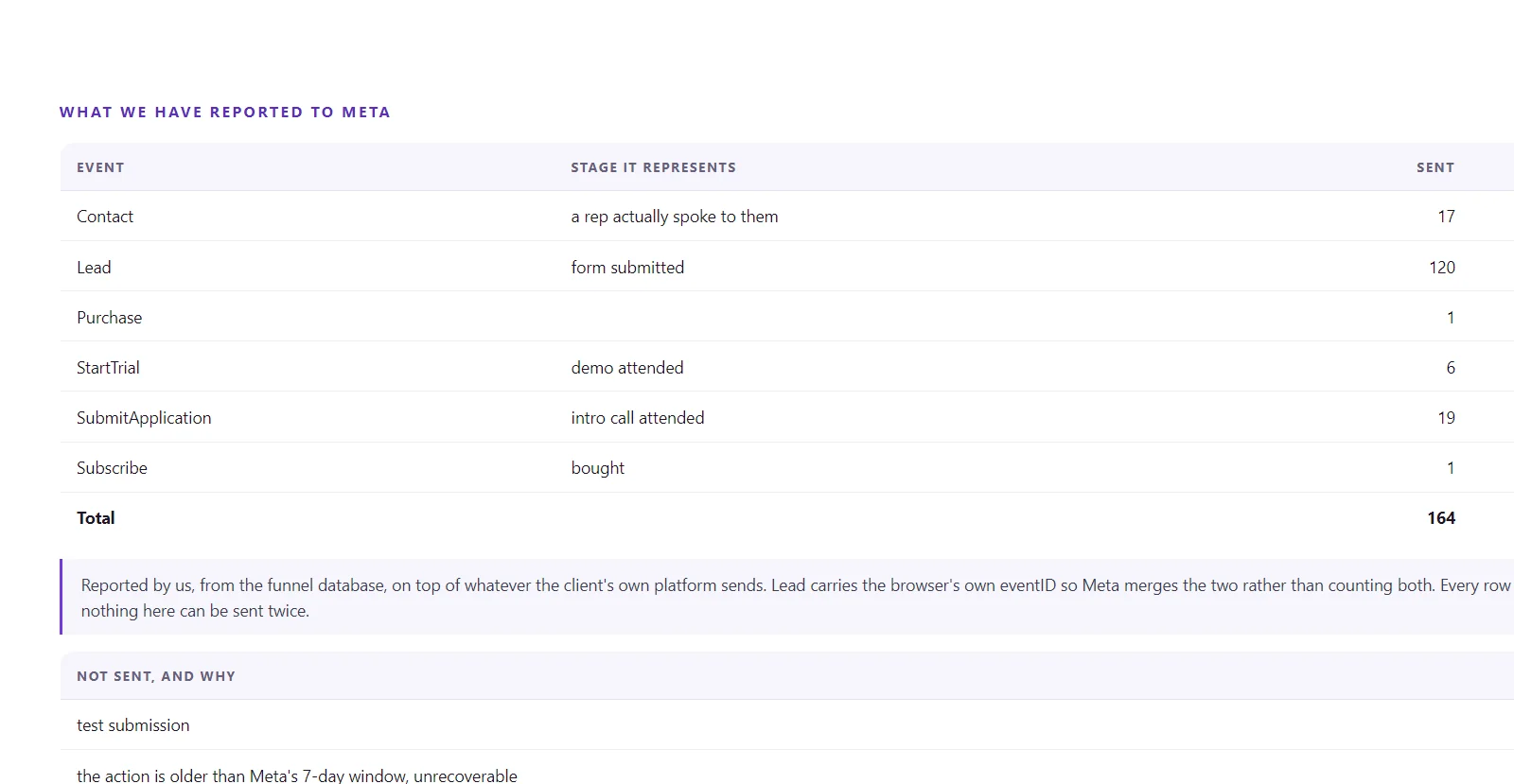
Lead$0.53Contact$0.72Schedule$0.72SubmitApplication$0.45StartTrial$0.99Subscribethe deal amountThis is the part that matters most. A lead worth $20 this week can be worth $30 next week when the funnel improves, and $5 the week the rep stops picking up because the volume went up and the leads got worse. Meta optimises toward the value it is told. Tell it March’s value and it optimises for March’s funnel.
Step 5: run it every morning
One command, every client, in this order. Each client’s run leaves the same four files in a dated folder that is never reused, so a day that was not read is still a day you can reconstruct.
- List the client pages. That folder is the run list. A page with no entry in the shared file, or the reverse, is an exception in the report, not something to work around.
- Pull your own leads and the conversion ledger. This is first-party truth and the only thing that knows which ad produced which person. File one,
platform.json. - Read their stage system, raw. Stripe rows, the Airtable export, the CRM deals, the call log. Unedited. File two,
stages.json. - Join. One row per person with rung, stage name and exit, plus the movement since yesterday, plus attribution: a person is yours only if their record in the client’s system was born on or after the day they filled your form. File three,
pipeline.json. - Dry run. Print what would fire and why, what is held and why, what is outside the window. File four,
owed.json. Nothing is sent. - Report, then stop. One line per client, the queue, the exceptions with a name attached, one closing line asking what you want.
- Fire when told. Then pull the ledger again and confirm it grew by exactly the number sent.
The report has one shape and never changes it, because you do not want to read tracking every day, you want to know whether anything needs you. If nothing is new anywhere, the whole report is two lines. The one warning that always stays in is the quiet one: a client whose webhook died looks exactly like a client who made no sales, and the age of the last row is the only thing separating them.
Step 6: put the guards in before anything fires
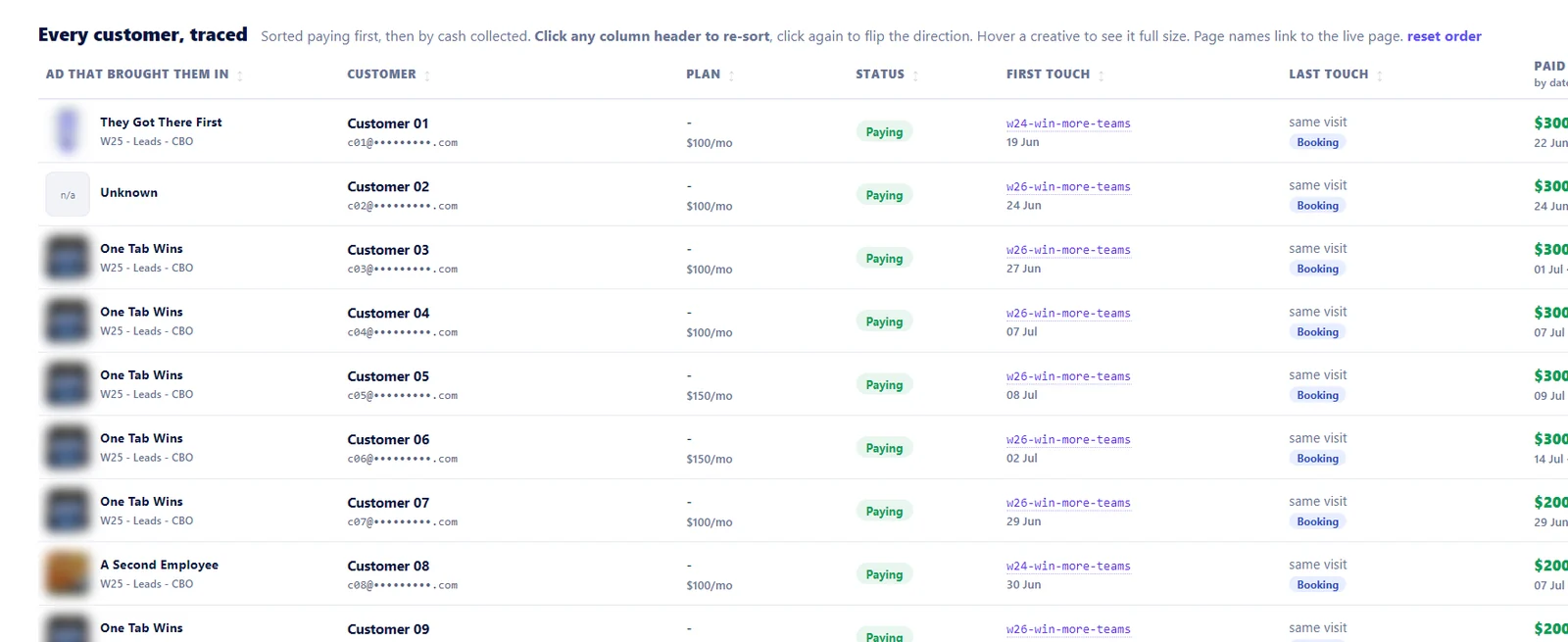
The events go into a live ad account. Meta has no un-send, and it does not deduplicate one server event against another. A second send is a second sale in the reporting, permanently. So the guards live in front of the request, not behind it.
- Dry run is the default. The live command is a separate, deliberate call.
- Nothing fires without a human. The report goes to you and the run stops. Silence is a no. It does not infer permission from yesterday.
- A hold is never auto-accepted. When two leads share an email, both candidates are printed with the fields that differ, and the row waits. Guessing credits the wrong ad forever.
- Deterministic event ids. Derived from the person and the event, never random. It is the double-fire guard across runs, and the key Meta uses to merge a browser event with yours.
- Never back-date. A conversion outside the seven-day window is recorded as lost and kept. Rewriting its timestamp puts a lie in the dataset for good.
- Identity is email, then phone in international format, then external id. Never a name, never how close two timestamps are.
- A failed row is checked before it is retried. The ledger row is written after the request, so “failed” can mean Meta has it and the write lost the race.
- An unknown flag is a hard error. Mine used to ignore them, which made asking the tool for help a live run. It fired twelve conversions before anyone read the output.
What you get
Meta starts learning from the bottom of the funnel instead of the top, with values that move as the account moves. That is the whole point of the Conversions API, and it is the part most setups never reach because the bottom of the funnel is in a tool the pixel cannot see.
The same data produces the client-facing report: what the ads collected, what it is worth monthly, trial to paid, months to payback, and which creative actually produced customers. The benchmarks and the case studies on this site are built from it, including the two accounts whose reports appear on this page, one and two.
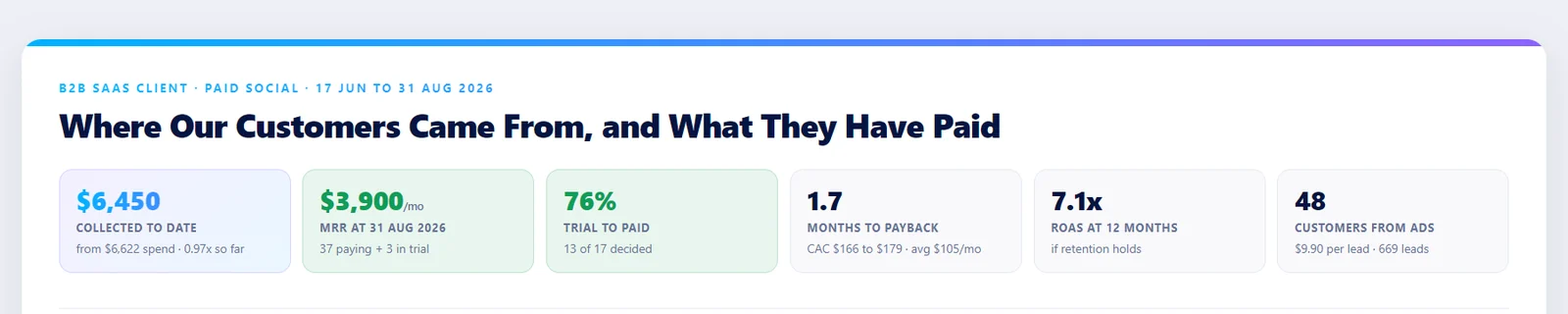
For me it is also how one person carries tracking for nine accounts. It is the fifth job on an agency roster and the first to rot when the other four get busy. Here it costs one message a morning, which is what makes the rest of the operating model hold.
Hand it to Claude Code
You do not have to build this by hand. Paste something like this into Claude Code, in the repo that holds your site or your data:
Read https://rodrigonask.com/meta-ads-capi-claude-code-zero-setup and build me
the same system for my stack.

My leads are stored in: <table, sheet or CRM>. They carry: <the fields you have>.
Sales and stage moves live in: <Stripe | HubSpot | Airtable | ...>.
Meta pixel id: <id>. Conversions API token: in an env var, never in a file.

Deliver: the skill folder with one shared file and one client page, the ladder
with a "means" for every rung, the event map with values, the four-file daily
run, and a sender whose default is a dry run. Do not fire anything. Stop at the
first dry-run report and show it to me.
If you want it to run unattended and prove it finished, wrap that in a goal with the Build a Goal skill. It will interview you about the parts above that only you can answer, mostly the ladder and the values, and refuse to call the work done without a dry-run report you can read.
When not to do this
If the funnel is one checkout page at one price and it has not changed in a year, set up the Conversions API once and leave it. It will hold, and this would be ceremony.
If you cannot get read access to wherever the sale is recorded, there is nothing to reconcile. The client’s own events are all Meta will ever get, and your job becomes fixing those.
If nobody is going to read the report, do not build it. A held row loses attribution as it ages and at day seven it is gone. A queue nobody answers is worse than no queue, because it looks like tracking.
If you would rather someone read your funnel every morning and told Meta the truth about it, that is the day job. If you want to build it yourself and get stuck on the ladder or the values, the 1-on-1 is where I walk people through their own version.
Book a callSee how I run a full stackWork with me 1-on-1Do I still need the Meta Pixel?
Not for conversions. Keep it for page views and retargeting audiences if you like, but it is no longer where Meta learns who bought. Your website stores the lead with the click id and the cookie id, and the run sends the conversion through the Conversions API later. If you also fire a browser Lead event, give it the same event id the server uses so Meta merges the two.
What exactly does my website have to store?
Email and phone as identity keys, the Facebook click id from the URL, the browser cookie id, the UTM source, medium, campaign and content with the ad id or creative name in content, the landing page, the time, and a lead id of your own. Store the raw values. Hashing happens at send time, because you need the raw email to match the sale later.
What if my funnel lives in a tool with no API?
Read it through the browser. One of my clients runs their whole pipeline in Airtable with dozens of automations, and an integration token would let one of them fire an email at a real person. So the run reads the base through my own Chrome session, read only, and never writes. Claude Code drives the browser; the client page tells it what to read and where the stage lives.
How does it decide what a lead is worth?
Expected value, measured from that account. Each stage carries the win rate from that stage times the mean won deal, and the run refreshes those numbers as the account moves. A measured rate only replaces the baseline once a stage has ten wins behind it. For a subscription business the sale carries the actual fee paid plus a predicted lifetime value from the median account life.
Is it safe to let Claude Code send conversions into a live ad account?
Only with the guards in front of the send. Every run is a dry run first and fires nothing until you say so. Event ids are deterministic, so a re-run cannot double-count. Anything the matcher is not sure about is held with both candidates printed, and a held row waits for a human rather than guessing. Unknown flags are a hard error, learned the expensive way.